Kubernetes: Basic
Jun 28, 2026Usage examples with descriptive comments and some brief explanations of core concepts of kubernetes. (Extra: k3s deployment on a VM inside a k8s cluster with kubevirt)
Basic usage
# Apply pod.yaml
kubectl apply -f <file.yaml>
kubectl replace -f <file.yaml>
kubectl create -f <file.yaml>

# Generating manifest.yaml for running resource
kubectl get deployment <name> -n <namespace> -o yaml > <name>.yaml
kubectl get pods busypod -o yaml --dry-run=client > busypod.yaml

kubectl exec -it <name> -- sh    # Connect to a Pod with shell

kubectl describe services/<name> #get service information / node port
kubectl get events -n k8s-hello --sort-by='.lastTimestamp'  # Get events from namespace for debugging

#expose deployment to ext traffic
kubectl expose deployment/<name> --type="NodePort" --port 8080

# Enable port forwarding for testing/debugging
kubectl port-forward --namespace argocd svc/argocd-server 8080:443
kubectl port-forward webserver-deployment-59966d5447-n7wlz 8888:80

### Helm: ###
# setup helm repo
helm repo add cilium https://helm.cilium.io/
helm install cilium cilium/cilium --version 1.18.4 \
    --namespace kube-system \
    --set kubeProxyReplacement=true \
    --set k8sServiceHost=${API_SERVER_IP} \
    --set k8sServicePort=${API_SERVER_PORT}

### CLI Usage + Setup ###
# cli-commands
kubectl create namespace <name>  #create namespace
kubectl create deployment <name> --image=<image> -n <namespace>  # create deployment
kubectl scale deployment <name> --replicas=2 -n <namespace>  #scale deployment

# Setup
#skip-phases is for cilium kube-proxy replacement
kubeadm init --skip-phases=addon/kube-proxy #Initalize control-plane-node
kubeadm join <..> # join worker nodes by specifying the cp node IP and the token returned by `kubeadm init`
Example Manifests.yml
# Service: exposes deployment under stable in-cluster name + IP
apiVersion: v1
kind: Service
metadata:
  name: webapp                       # other pods reach this as http://webapp
spec:
  type: ClusterIP                    # internal only; use NodePort/LoadBalancer to expose externally
  selector:
    app: webapp                      # routes traffic to all pods with label app=webapp
  ports:
    - port: 80                       # port the service listens on
      targetPort: http               # named port on the pod (see containers.ports.name)
---
# PVC: request 1Gi storage from default StorageClass
# (e.g. local-path-provisioner on bare-metal, EBS on AWS, etc.)
apiVersion: v1
kind: PersistentVolumeClaim
metadata:
  name: webapp-data
spec:
  accessModes:
    - ReadWriteOnce         # mounted r/w by a single node at a time
  resources:
    requests:
      storage: 1Gi
  # storageClassName: local-path     # omit to use the cluster's default StorageClass
---
# Deployment: 2 replicas with PVC mount, resource limits, probes, sidecar
apiVersion: apps/v1
kind: Deployment
metadata:
  name: webapp
  labels:
    app: webapp
spec:
  replicas: 2
  selector:
    matchLabels:
      app: webapp
  template:
    metadata:
      labels:
        app: webapp        # must match the service's selector above
    spec:
      # ------------------------------------------------------------
      # Sidecar: runs alongside main container for pod lifetime.
      # Classic use: log shipper, proxy (Istio), secret fetcher.
      initContainers:
        - name: log-shipper
          image: alpine:3.20
          restartPolicy: Always      # THIS is what makes it a sidecar, not a one-shot init
          command: ["sh", "-c", "tail -F /var/log/app/access.log"]
          volumeMounts:
            - name: data             # refers to volumes.name below
              mountPath: /var/log/app
              readOnly: true

      containers:
        - name: webapp
          image: nginx:1.27
          ports:
            - name: http             # named port referenced by service.targetPort + probes
              containerPort: 80

          # --------------------------------------------------------
          # Resource requests/limits
          # requests = guaranteed minimum, used by scheduler to place the pod
          # limits   = hard cap; CPU throttled, memory
          resources:
            requests:
              cpu: 100m              # 0.1 CPU core
              memory: 128Mi
            limits:
              cpu: 500m              # 0.5 CPU core
              memory: 256Mi

          # --------------------------------------------------------
          # Liveness probe: Fail = kubelet RESTARTS the container
          livenessProbe:
            httpGet:
              path: /healthz         # your app should expose a cheap health endpoint
              port: http
            initialDelaySeconds: 15  # wait 15s before first check
            periodSeconds: 20        # then check every 20s
            failureThreshold: 3      # 3 fails in a row = restart

          # --------------------------------------------------------
          # Readiness: "Ready for traffic?" If it fails => pod is REMOVED from Service's endpoints (no traffic), but NOT restarted
          # Use for warmup, DB connection, cache load
          readinessProbe:
            httpGet:
              path: /ready
              port: http
            initialDelaySeconds: 5
            periodSeconds: 10
            failureThreshold: 3

          # -------------------------------------------------------
          # Mount the PVC into the container's filesystem
          volumeMounts:
            - name: data             # refers to volumes.name below
              mountPath: /var/log/app

      # ------------------------------------------------------------
      # Volumes: declared @pod level, referenced by containers above.
      # Sidecar and main container share this volume (sidecar can tail logs)
      # written by the main app.
      volumes:
        - name: data
          persistentVolumeClaim:
            claimName: webapp-data   # must match the PVC name from above

  # ----------------------------------------------------------------
  # Rolling update strategy: replace pods gradually, zero downtime
  strategy:
    type: RollingUpdate
    rollingUpdate:
      maxSurge: 1           # 1 extra pod during update
      maxUnavailable: 0     # never drop below desired replica count
Deployments & ReplicaSet
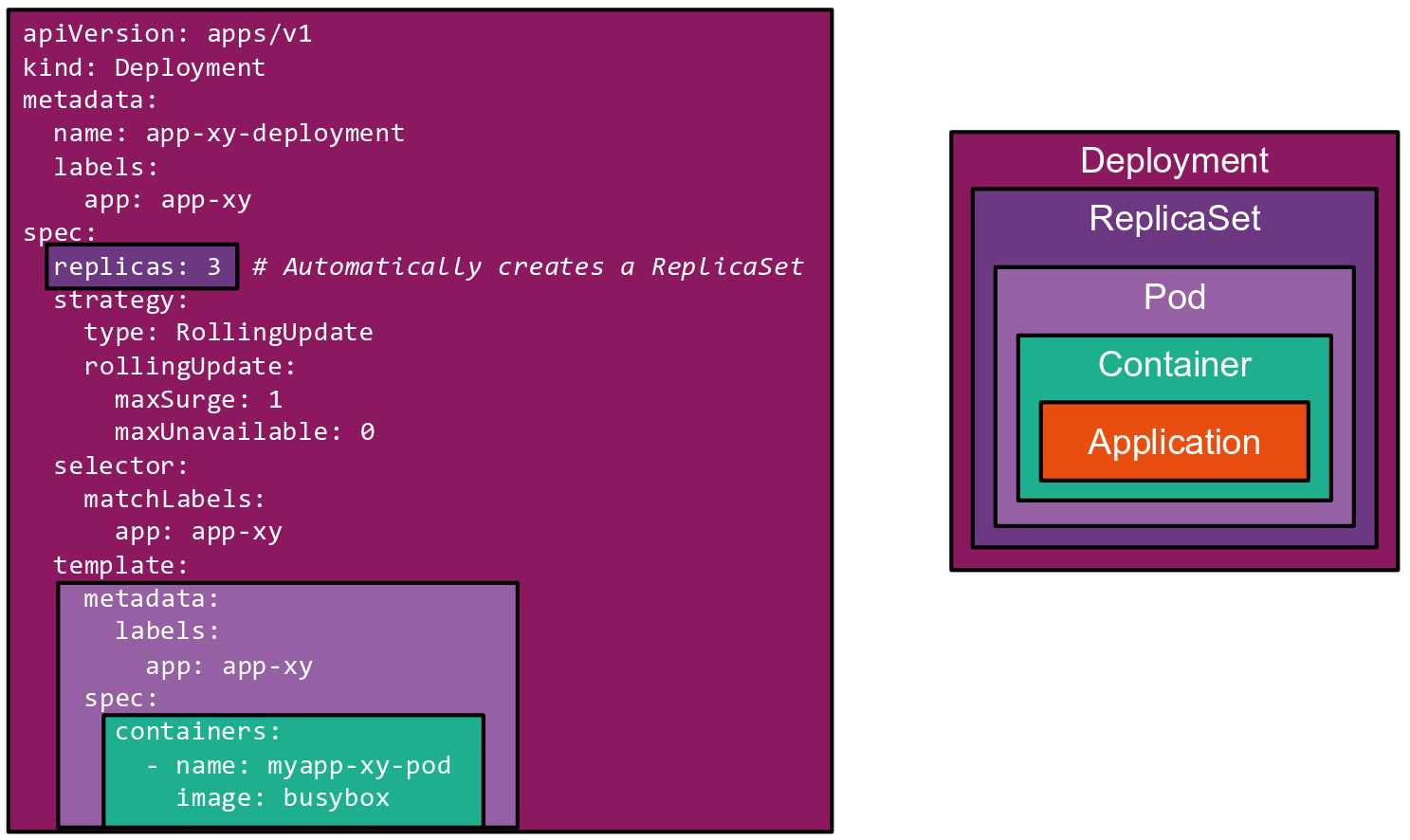
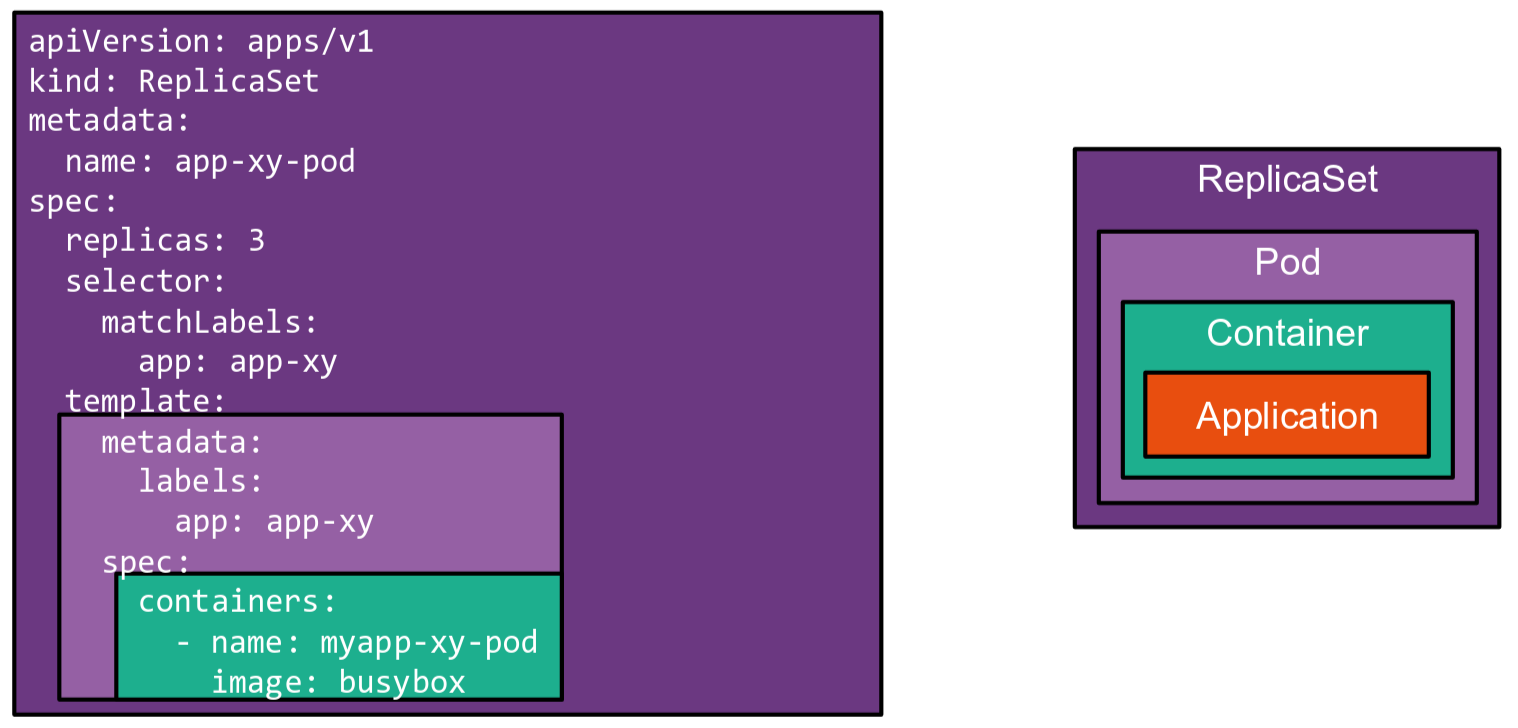
Deployment is a Higher-level concept that manages ReplicaSets and provides declarative updates to Pods. (Recommended instead of directly using ReplicaSets, unless you require custom update orchestration or don’t require updates at all)
Use cases:
- Declare the new state of the Pods
- Scale up the Deployment to facilitate more load
- Providing Update Strategies
More types:
==DaemonSet:== Runs on every node in the cluster. Can be very useful when deploying a logging-application for example.
==StatefulSet:== For stateful applications that need stable identity (eg. pod name logging-0) and persistent storage per pod.
kubectl get deployments
#NAME DESIRED CURRENT UP-TO-DATE AVAILABLE AGE
#app-xy-deployment 3 3 3 3 12s
kubectl --record set image deployment app-xy-deployment app-xy=busybox:1.31.0 # Update an image tag:
kubectl edit deployment app-xy-deployment # or

kubectl autoscale deployment php-apache --cpu-percent=50 --min=1 --max=10    # Enable Autoscaling

kubectl rollout history # Details about recent transactions/updates

kubectl rollout undo    # rollback last change
apiVersion: apps/v1
kind: Deployment
metadata:
 name: nginx-deployment
 labels:
   app: nginx
spec:
 replicas: 3
 selector:
   matchLabels:
     app: nginx
 template:
   metadata:
     labels:
       app: nginx
   spec:
     containers:
     - name: nginx
       image: nginx:1.14.2
       ports:
         - containerPort: 80
	   resources:       # limit resources
		  limits:
		     memory: "200Mi"  # Max before throttling
		     cpu: "500m"
		  requests:
			 memory: "100Mi"  # Min for scheduling
			 cpu: "250m"

 strategy:
   type: RollingUpdate  # Update strategy
   rollingUpdate:
     maxSurge: 1
     maxUnavailable: 1
Storage
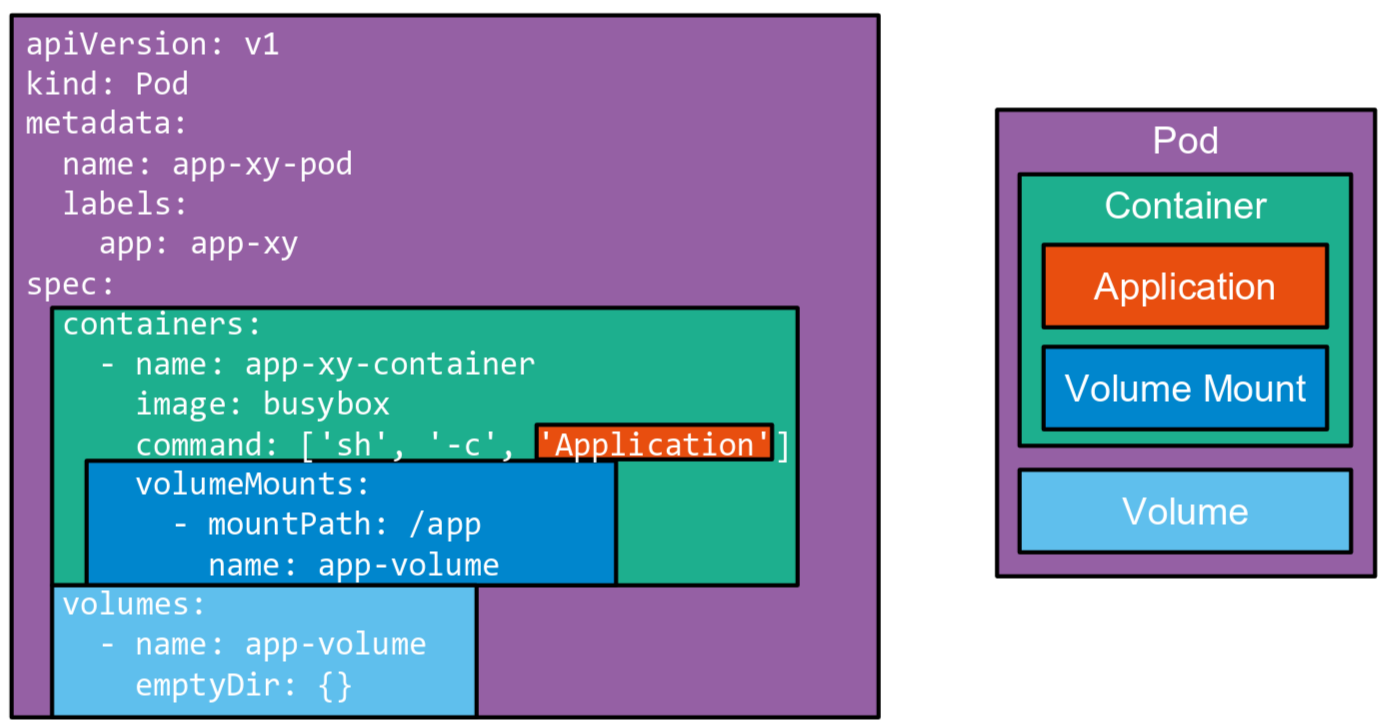
Files stored in a container will only live as long as the container itself.
Local Path Provisioner
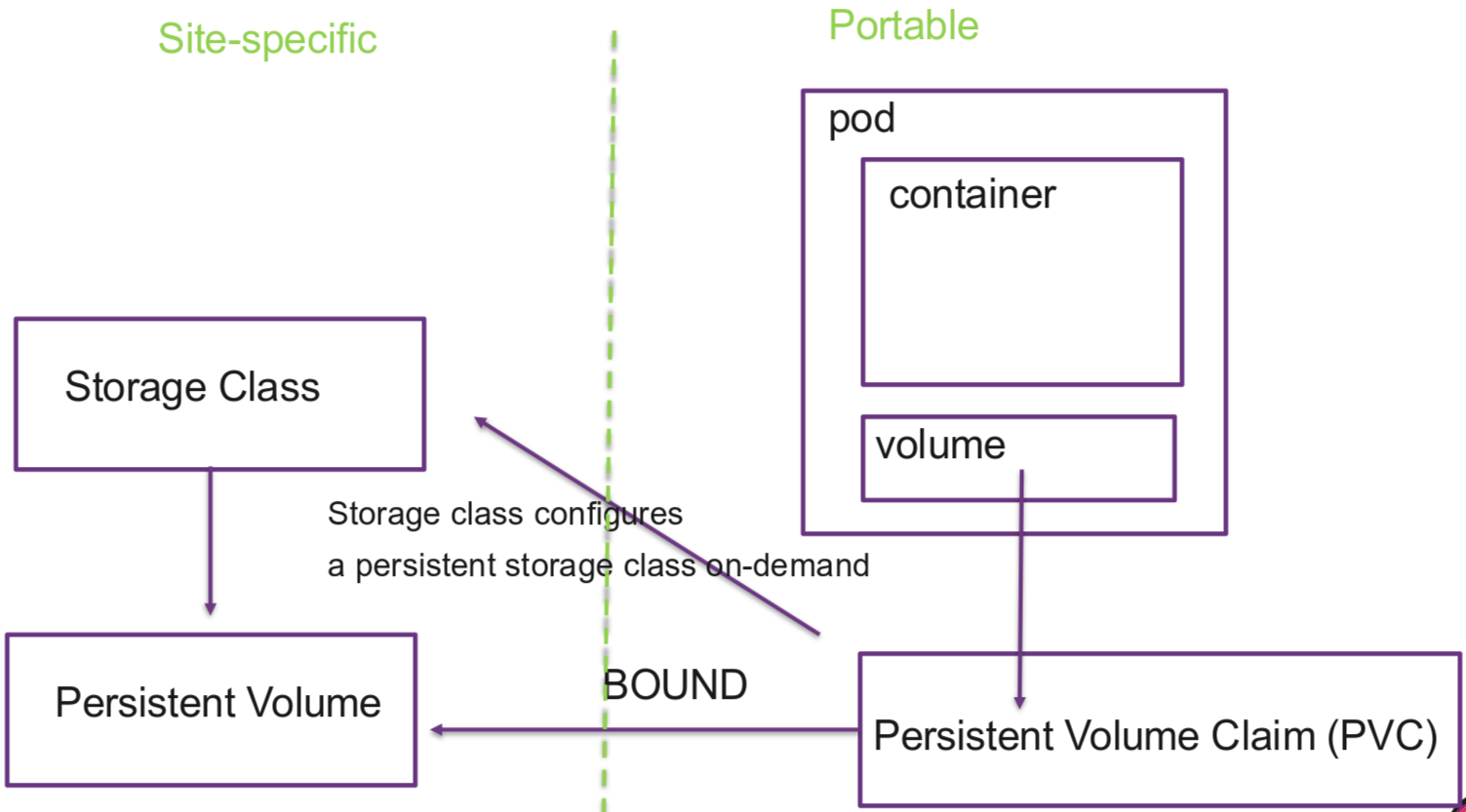
In the cloud, PVCs are automatically backed by services like AWS EBS or GCP PD. On bare-metal or VM clusters there’s no such backend, so the Local Path Provisioner takes over and creates PVs as local directories on the node. Node-bound, no replication.
#Install
kubectl apply -f https://raw.githubusercontent.com/rancher/local-path-provisioner/v0.0.32/deploy/local-path-storage.yaml
Services
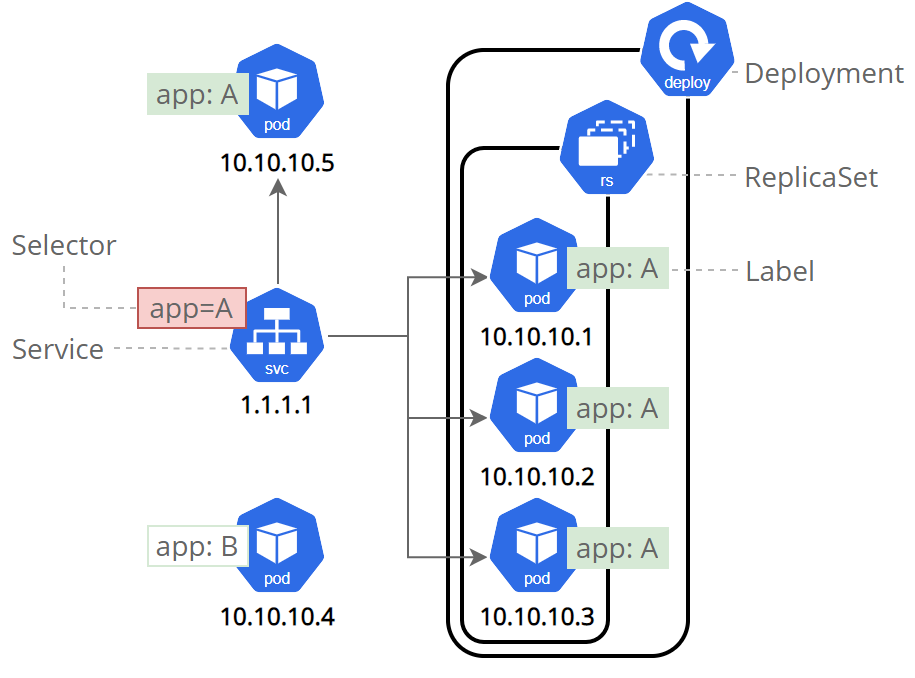
Service Types:
- ClusterIP: Internal-only access within cluster (default)
- NodePort: Exposes svc on each node’s IP at a static port
- LoadBalancer: Exposes externally using cloud providers LB
- ExternalName: Maps service to external DNS name
ConfigMap & Secrets
==ConfigMap:== non-sensitive config (URLs, feature flags, log levels, settings) Stored as plain text in etcd. NEVER use for passwords, tokens, keys.
==Secret:== sensitive data (passwords, tokens, TLS keys, API credentials) Stored base64-encoded in etcd (NOT encrypted by default! enable encryption at rest in the cluster, and restrict access via RBAC).
apiVersion: v1
kind: ConfigMap
metadata:
  name: webapp-config
data:   # Key-value pairs: consumed as env vars or individual files
  LOG_LEVEL: "info"
  FEATURE_DARK_MODE: "true"
  API_TIMEOUT: "30s"

  # Whole config file as a multi-line string -> mounted as a file
  app.conf: |
    server.port=8080
    server.host=0.0.0.0
    cache.ttl=300
---
apiVersion: v1
kind: Secret
metadata:
  name: webapp-secrets
type: Opaque        # generic secret; other types: kubernetes.io/tls, dockerconfigjson, ...
stringData:      # plain text — Kubernetes base64-encodes it for you
  DB_PASSWORD: "super-secret-pw"   # use `data:` instead if you want to provide base64 yourself
  API_KEY: "sk-abc123xyz"
---
apiVersion: apps/v1
kind: Deployment
metadata:
  name: webapp
spec:
  replicas: 1
  selector:
    matchLabels:
      app: webapp
  template:
    metadata:
      labels:
        app: webapp
    spec:
      containers:
        - name: webapp
          image: nginx:1.27
          ports:
            - containerPort: 8080

          # -------------------------------------------------------
          # single env var from a specific key
          # Use for: a few specific values you want to rename or pick selectively
          env:
            - name: LOG_LEVEL           # name inside the container
              valueFrom:
                configMapKeyRef:
                  name: webapp-config   # which ConfigMap
                  key: LOG_LEVEL        # which key from it
            - name: DB_PASSWORD
              valueFrom:
                secretKeyRef:
                  name: webapp-secrets
                  key: DB_PASSWORD

          # -----------------------------------------------------
          # bulk-load ALL keys from a ConfigMap/Secret as env vars
          # Use for: when you want everything, no renaming needed
          envFrom:
            - configMapRef:
                name: webapp-config   # exposes LOG_LEVEL, FEATURE_DARK_MODE, API_TIMEOUT
            - secretRef:
                name: webapp-secrets  # exposes DB_PASSWORD, API_KEY
                # Note: app.conf is also exposed as an env var here — usually undesired.

          # -------------------------------------------------------------------
          # mount as files (one file per key)
          # Use for: config files apps expect to read from disk (e.g. nginx.conf,
          # TLS certs, JSON/YAML config). Updates to the ConfigMap propagate
          # automatically (~1 min); env vars do NOT update without a restart.
          volumeMounts:
            - name: config-files
              mountPath: /etc/webapp   # → /etc/webapp/app.conf, /etc/webapp/LOG_LEVEL, ...
              readOnly: true
            - name: tls-certs
              mountPath: /etc/webapp/tls
              readOnly: true

      volumes:
        - name: config-files
          configMap:
            name: webapp-config
            items:           # OPTIONAL: pick specific keys + rename
              - key: app.conf
                path: app.conf     # mounted as /etc/webapp/app.conf
        - name: tls-certs
          secret:
            secretName: webapp-secrets
            defaultMode: 0400      # read-only for owner; sensible default for secrets
Kubevirt / VMs in K8s
kubectl apply -f hello-fedora.yml # start VM
kubectl delete -f hello-fedora.yml # delete VM

kubectl describe vmi <vm-name> -n <namespace> # Check state of pod

kubectl get dv # Check dv state / image download
#NAME        PHASE       PROGRESS   RESTARTS   AGE
#fedora-dv   Succeeded   100.0%                4d21h

virtctl console hello-fedora # access VM (serial console)

#Expose port on vm
virtctl expose vm hello-fedora --name=hello-fedora --port=22 --target-port=22 --type=NodePort
hello-fedora.yml
apiVersion: kubevirt.io/v1
kind: VirtualMachine
metadata:
 creationTimestamp: 2018-07-04T15:03:08Z
 generation: 1
 labels:
   kubevirt.io/os: linux
 name: hello-fedora
 namespace: default
k3s
K3s: Configuring containerd
We are going to run k3s inside a Fedora VM. K3s ships with its own containerd at /run/k3s/containerd/containerd.sock. For this task we want K3s to use the host’s containerd at /run/containerd/containerd.sock instead, configured via --container-runtime-endpoint.
Since Fedora uses systemd as its init system and cgroup manager, containerd (or rather runc underneath it) must also use the systemd cgroup driver. Otherwise containerd and systemd manage the same cgroups independently, which is unstable under load. Kubernetes requires kubelet and the container runtime to agree on one driver.
To generate the basic config we use containerd config default > /etc/containerd/config.toml.
We change it according to the kubernetes.io documentation https://kubernetes.io/docs/setup/production-environment/container-runtimes/#containerd
[plugins.'io.containerd.cri.v1.runtime'.containerd.runtimes.runc]
  ...
  [plugins.'io.containerd.cri.v1.runtime'.containerd.runtimes.runc.options]
    SystemdCgroup = true
Running K3s inside a VM
Installing k3s with the --flannel-backend and --container-runtime-endpoint flags.
#server
curl -sfL https://get.k3s.io | INSTALL_K3S_VERSION=v1.34.2+k3s1 sh -s - server \
  --cluster-cidr=172.20.0.0/16 \
  --service-cidr=172.21.0.0/16 \
  --flannel-backend=vxlan \
  --container-runtime-endpoint unix:///run/containerd/containerd.sock \
  --write-kubeconfig-mode 644 \
  --token=Task3Token

# agent
curl -sfL https://get.k3s.io | INSTALL_K3S_VERSION=v1.34.2+k3s1 K3S_URL=https://10.0.2.124:6443 K3S_TOKEN=Task3Token sh -s - agent --container-runtime-endpoint unix:///run/containerd/containerd.sock
Additionally we need to provide the default config for flannel and the binary where containerd searches for it.
While trying to start k3s I got these errors:
#Error while starting k3s:
Dec 13 20:04:49 k3s-server containerd[3981]: time="2025-12-13T20:04:49.412577835Z" level=info msg="No cni config template is specified, wait for other system components to drop the config."
As we are using flannel as our CNI and don’t use the cointainerd that comes with k3s. We need to provide a CNI Config for containerd.
Containerd normally looks in /etc/cni/net.d/ for a config file, so lets create one for it.
/etc/cni/net.d/10-flannel.conflist
{
	"name": "cbr0",
	"cniVersion": "1.0.0",
	"plugins": [
		{
			"type": "flannel",
			"delegate": {
				"hairpinMode": true,
				"isDefaultGateway": true
			}
		},
		{
			"type": "portmap",
			"capabilities": {
				"portMappings": true
			}
		}
	]
}
Now k3s booted up normally. When trying to create an example pod I encountered another error
kubectl get events -n k8s-hello --sort-by='.lastTimestamp'
LAST SEEN   TYPE      REASON                   OBJECT                                      MESSAGE
3m11s       Warning   FailedCreatePodSandBox   pod/kubernetes-bootcamp-658f6cbd58-zgx2t    (combined from similar events): Failed to create pod sandbox: rpc error: code = Unknown desc = failed to setup network for sandbox "45bea...cc9f": plugin type="flannel" failed (add): failed to find plugin "flannel" in path [/opt/cni/bin]
Again, since we use our own containerd version, it searches for binaries in the default path /opt/cni/bin/ .
So we either need to configure it to search for binaries in the k3s path or create a symlink to the default path.
sudo mkdir -p /opt/cni/bin
sudo ln -sf /var/lib/rancher/k3s/data/current/bin/* /opt/cni/bin/
spec:
 runStrategy: Always
 template:
   metadata:
     creationTimestamp: null
     labels:
       kubevirt.io/domain: hello-fedora
   spec:
     domain:
       cpu:
         cores: 2
       devices:
         disks:
         - disk:
             bus: virtio
           name: disk0
         - cdrom:
             bus: sata
             readonly: true
           name: cloudinitdisk
       machine:
         type: q35
       resources:
         requests:
           memory: 1024M
     volumes:
     - name: disk0
       persistentVolumeClaim:
         claimName: fedora
     - cloudInitNoCloud:
         userData: |
           #cloud-config
           hostname: hello-fedora
           ssh_pwauth: True
           disable_root: false
           ssh_authorized_keys:
           - ecdsa-sha2-nistp521 AAAAE2VjZHNhLWk...2F/RZ1skEw==
           - ssh-ed25519  AAAC3NzaC1lZDI1NTE5AAA...DDTj
       name: cloudinitdisk
     source:
       http:
         url: "https://mirror.init7.net/fedora/fedora/linux/releases/43/Cloud/x86_64/images/Fedora-Cloud-Base-AmazonEC2-43-1.6.x86_64.raw.xz"